Short answer: an eSIM works by downloading a mobile plan, called a profile, onto a chip already inside your phone. You scan a QR code or tap an install link, the phone fetches the encrypted profile from the operator's server, and a new line appears in Settings. It connects to a network the first time you are in coverage.
Knowing how an eSIM works saves you from the two most common travel mistakes: trying to install it at the arrivals gate with no Wi-Fi, and landing with data roaming switched off on the wrong line.
This guide walks through the whole path, from the code in your inbox to the first megabyte abroad. It covers QR code versus direct install, when the plan's days start, how dual SIM keeps your home number, and the data roaming setting. Steps are taken from Apple and Google's own support pages, checked on 29 September 2026.
How does an eSIM work, step by step?
An eSIM works in five steps: buy, scan, download, arrive, connect. The only step that needs an internet connection at home is the download.
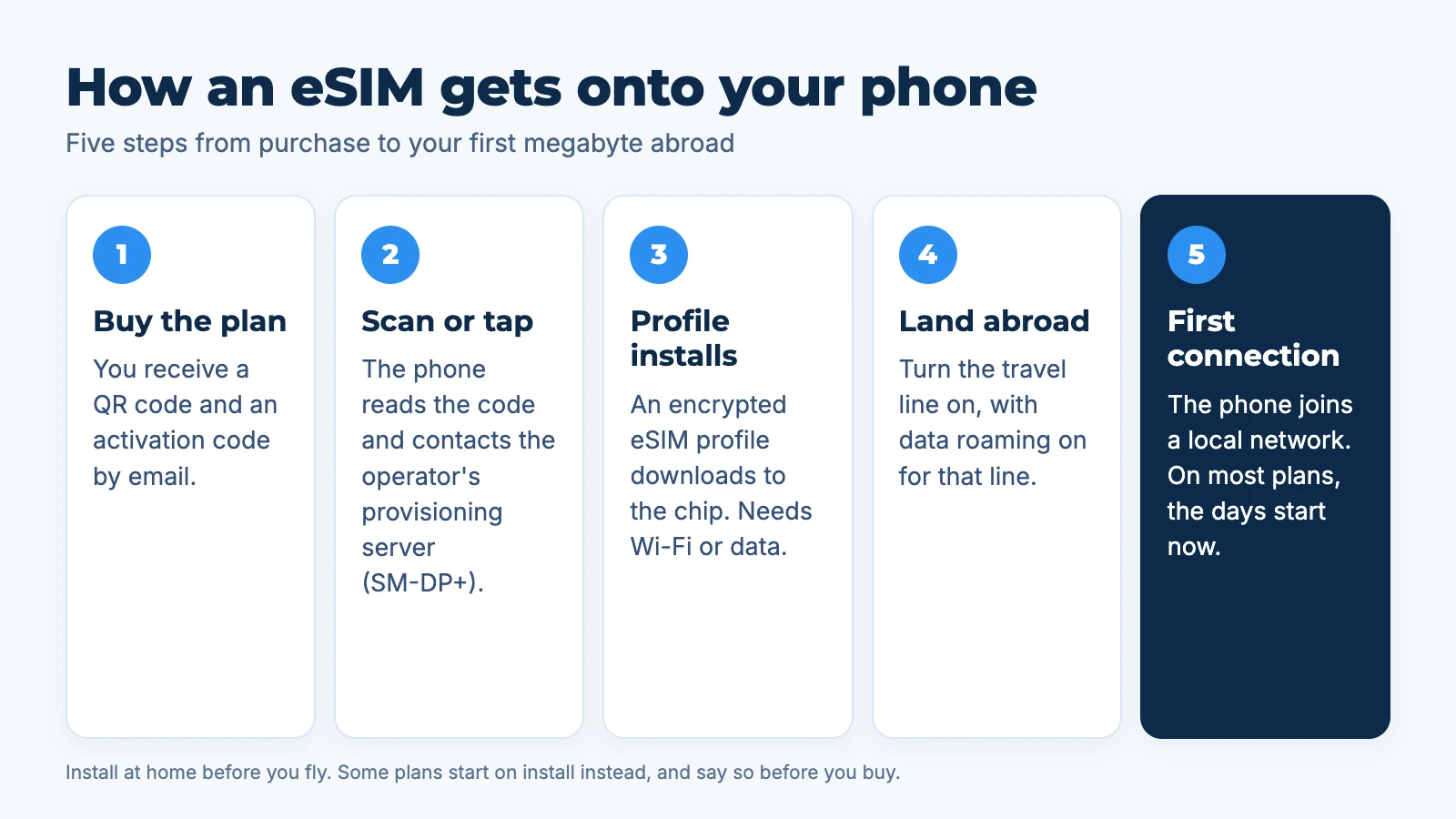
- Buy the plan. You get an email with a QR code and the same details as text, often called the activation code.
- Scan or tap. Your phone reads the code, which points to the operator's provisioning server (the GSMA calls it SM-DP+) and identifies your profile.
- The profile downloads. The encrypted profile installs on the eSIM chip and a new line appears in Settings. This needs Wi-Fi or mobile data.
- You land. You turn the travel line on and switch on data roaming for that line.
- First connection. The phone registers on a local network. On most travel plans the validity period starts here, not at purchase.
If you have not read it yet, what is an eSIM covers the basics this guide builds on.
What happens when you scan the eSIM QR code?
The QR code is only an address and a password. It tells your phone which server to contact and which profile to collect, and it does nothing on its own. The phone then downloads the profile securely and installs it, which usually takes a minute or two on Wi-Fi.
That is why most providers treat a code as single use: once the profile is installed, it is tied to that phone. Keep the email, but treat the install as a one-time step. At Aynet, a plan that was never installed can be refunded, so if you think you bought the wrong one, write to support before you scan.
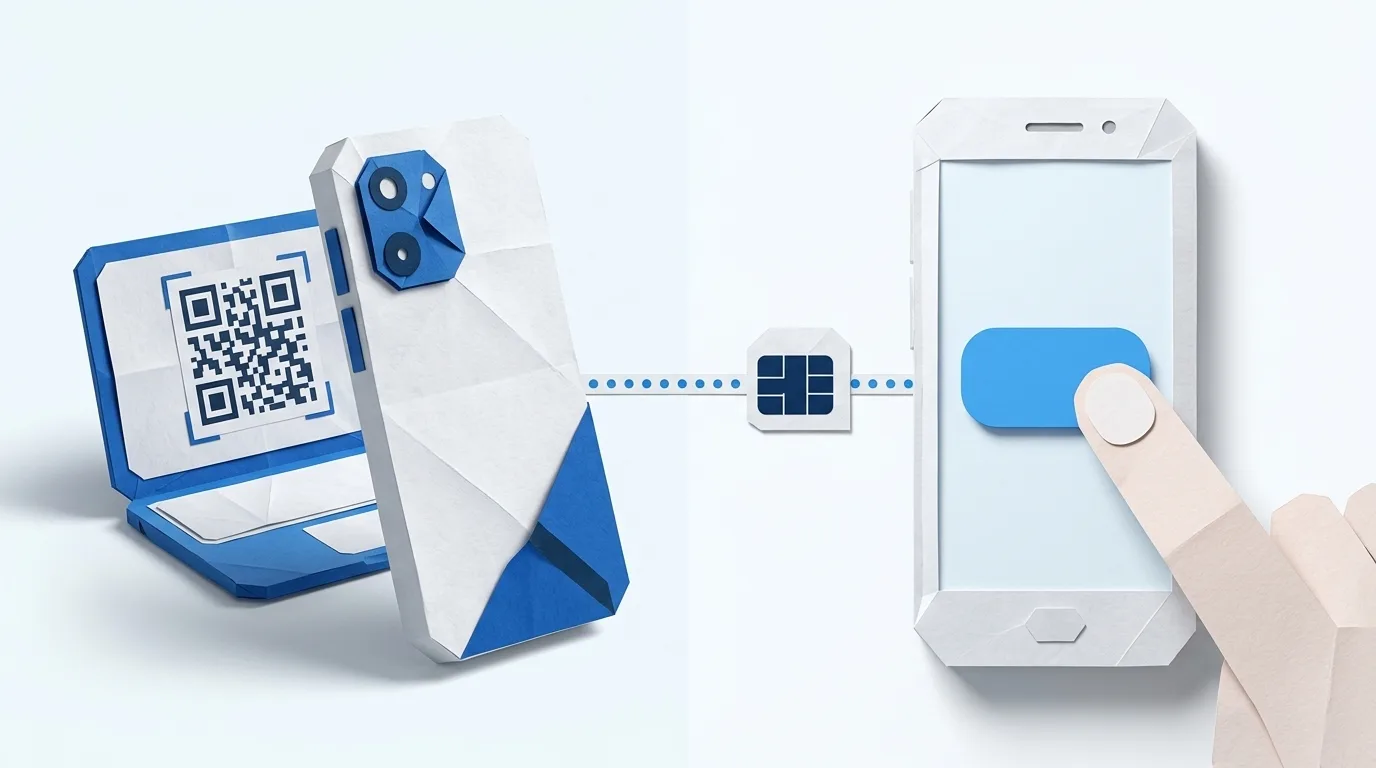
Worth knowing: you cannot scan a QR code shown on the same phone's screen. Open the email on a laptop or tablet and scan it from there, or use the manual entry option described below.
QR code or direct install: which is better?
Both install the same profile; the difference is only how the phone receives the details. A QR code is universal, while direct install is quicker when the provider supports it on your phone.
| Method | How it works | Needs a second screen? | Suits |
|---|---|---|---|
| QR code | Scan with the phone's camera from Settings | Yes, or a printout | Any eSIM phone |
| Manual entry | Type the SM-DP+ address and activation code | No | When scanning fails |
| Direct install | Tap a link or button that opens the install sheet | No | Supported iPhones and Android phones |
| Carrier activation | The operator pushes the eSIM to your account | No | Your home carrier line |
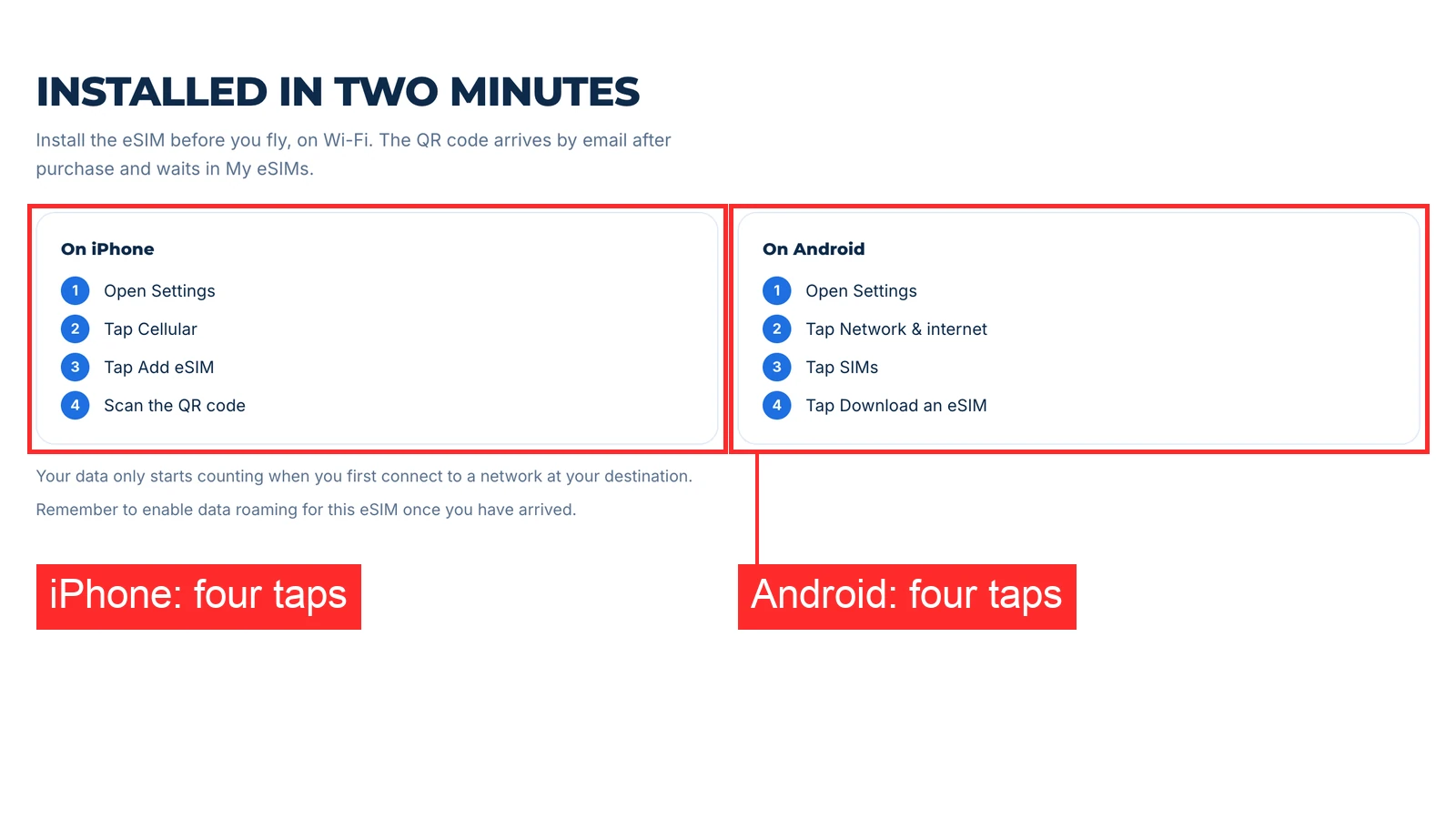
On an iPhone, the path is Settings, Mobile Service (Cellular), Add eSIM. On a Pixel, Google's path is Settings, Network and internet, SIMs, Add SIM, Set up an eSIM. On a Samsung Galaxy, it is Settings, Connections, SIM manager, Add eSIM.
The Aynet destination pages show the same steps next to each plan. This is the install box on the Turkey page:
When does an eSIM activate?
On most travel plans the eSIM activates, and the days start counting, the first time it connects to a supported network at your destination. Installing it at home does not use any days. A small number of plans start on installation instead, and the plan should say so before you buy.
At Aynet this is shown per plan. As of 29 September 2026, almost every Turkey, USA, Thailand, Egypt and Morocco plan starts on first connection; the exceptions, such as the 100 MB plans, start on install and say so. Always check the plan card rather than assuming.
In short: install at home, activate abroad.
How does dual SIM work with an eSIM?
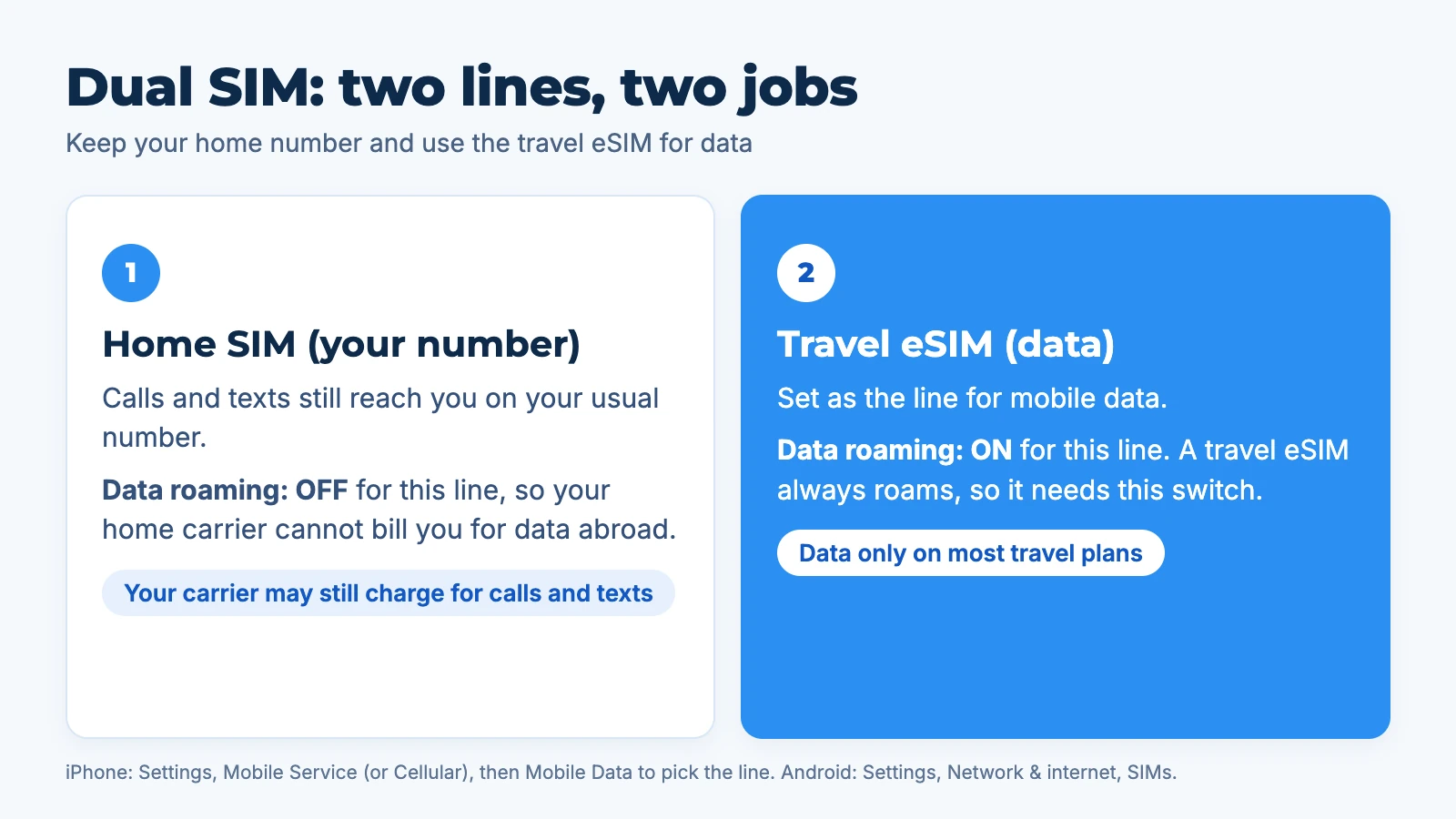
Dual SIM lets your phone run two lines at once: your home SIM for calls and texts, and the travel eSIM for mobile data. Apple says iPhone XS and later support dual SIM with an eSIM, and iPhone 13 and later can run two eSIMs at once. Only one line uses mobile data at a time, and you choose which.
Set it up like this before you fly:
- Label the lines, for example "Home" and "Travel", when the phone asks.
- Choose the travel line for mobile data. On iPhone: Settings, Mobile Service, Mobile Data.
- Leave the home line as the default for calls and iMessage or WhatsApp if you want to keep your usual number visible.
- Turn off "Allow Mobile Data Switching" on iPhone if you do not want the phone to fall back to your home line for data.
Your home carrier may still charge for calls and texts you make or receive abroad on the home line. That depends on your plan, not on the eSIM.
Do I need data roaming on for an eSIM?
Yes, on the travel line. A travel eSIM is technically roaming on a partner network in the country you visit, so the phone will not use it for data unless data roaming is on for that line. Turning it on costs nothing extra.
Keep data roaming off on your home line. That is what stops your home carrier from charging you for data abroad.
- iPhone: Settings, Mobile Service, tap the travel line, Mobile Data Options, Data Roaming on (Apple).
- Pixel: Settings, Network and internet, SIMs, tap the travel line, Roaming on.
- Samsung: Settings, Connections, Mobile networks, Data roaming, per SIM.
If your phone shows full bars but no internet after landing, this switch is the first thing to check.
What happens when the eSIM plan runs out?
When the data or the days run out, the line simply stops carrying data. There is no automatic overage charge on a prepaid travel eSIM. You can top up the same eSIM, or buy a new one, and the profile stays installed until you delete it.
Apple adds one convenience from iOS 26: depending on your country or region, the iPhone can switch off the travel eSIM and turn your home SIM back on automatically when you return home.
Do you need an unlocked phone for an eSIM to work?
Yes. A phone locked to one carrier will usually refuse another carrier's eSIM, even though the chip is there. Check this before you buy; on an iPhone it is one screen in Settings, and our guide on how to check if your phone is unlocked covers iPhone, Samsung and the SIM swap test.
To check the model itself supports eSIM, use the eSIM compatibility checker.
When you are ready, see the Thailand eSIM plans for a trip there, or describe any trip to the Aynet trip advisor and get one plan with the network and start rule shown before you pay.
FAQ
How does an eSIM work abroad?
An eSIM works abroad by connecting to a local partner network in the country you are visiting, using the profile you installed at home. You turn on the travel line and data roaming for that line, and the phone joins the network when you land. Your home SIM can stay on for calls and texts.
Does an eSIM need Wi-Fi to install?
Yes, installing an eSIM needs an internet connection, usually Wi-Fi, because the phone downloads the profile from the operator's server. After installation it no longer needs Wi-Fi. That is why you should install it at home or at the hotel, not in the arrivals hall.
How does an eSIM work with a normal SIM?
The phone runs both at once as dual SIM. The physical SIM keeps your home number for calls and texts, and the eSIM carries mobile data. You pick which line uses data in Settings, and only one line uses data at a time.
Can I install an eSIM before my trip?
Yes, and you should. On most travel plans the days only start when the eSIM first connects at your destination, so installing a week early costs nothing. At Aynet, each plan card says whether it starts on first connection or on install.
Can I reuse the eSIM QR code?
Usually no. A QR code normally installs its profile once, so deleting the eSIM and scanning again will not bring it back. If you delete it by mistake, contact the provider, who may be able to issue a new one.
Why does my eSIM show signal but no internet?
The most common cause is data roaming being off on the travel line, or the phone still using the home line for mobile data. Turn on data roaming for the eSIM and select it as the mobile data line. If it still fails, restart the phone once.
Sources: Apple, Using Dual SIM with an eSIM, Apple, About eSIM on iPhone, Apple, Using eSIM while travelling, Apple, View or change mobile data settings, Google Pixel, Use an eSIM, Samsung, Add an eSIM, GSMA, eSIM, Aynet catalogue, 29 September 2026. All checked 29 September 2026.
- #Esim Basics
- #Installation
關於作者
Taha Latif
Design and analytics
Leads design and analytics at Aynet, from the trip planner to the eSIM install flow.