Planera din resa
Ont om tid? Berätta vart du ska.
Reseplaneraren väljer ett eSIM för dina resedatum och visar det faktiska priset.
Short answer: on an iPhone, open Settings, General, About and look at Carrier Lock: "No SIM restrictions" means it is unlocked. On a Samsung, check Settings, Connections, More connection settings, Network unlock. On any phone, insert a SIM from another network: if it connects, the phone is unlocked.
A locked phone is the most common reason a travel eSIM will not work, and you usually find out after landing, when the eSIM will not connect. Checking if your phone is unlocked takes under a minute and is worth doing before you buy any travel SIM or eSIM.
This guide covers the official checks for iPhone and Samsung, a test that works on any Android phone, and what to do if the answer is "locked", with the unlocking rules of the main UK and US carriers. Every step and rule below links to the carrier's, Apple's, Samsung's or the regulator's own page, checked on 29 September 2026.
What does "unlocked" mean?
An unlocked phone accepts a SIM or eSIM from any network; a carrier-locked phone only works with the network that sold it. The lock is a software setting the carrier applies, often while you are still paying the phone off.
It matters for travel because a travel eSIM runs on a different network from your home carrier. A locked phone may install the eSIM and then refuse to connect, or refuse to install it at all.
How to check if your iPhone is unlocked
On iOS 14 or later, Apple's check is one screen in Settings:
- Open Settings.
- Tap General.
- Tap About.
- Look next to Carrier Lock. "No SIM restrictions" means the iPhone is unlocked.
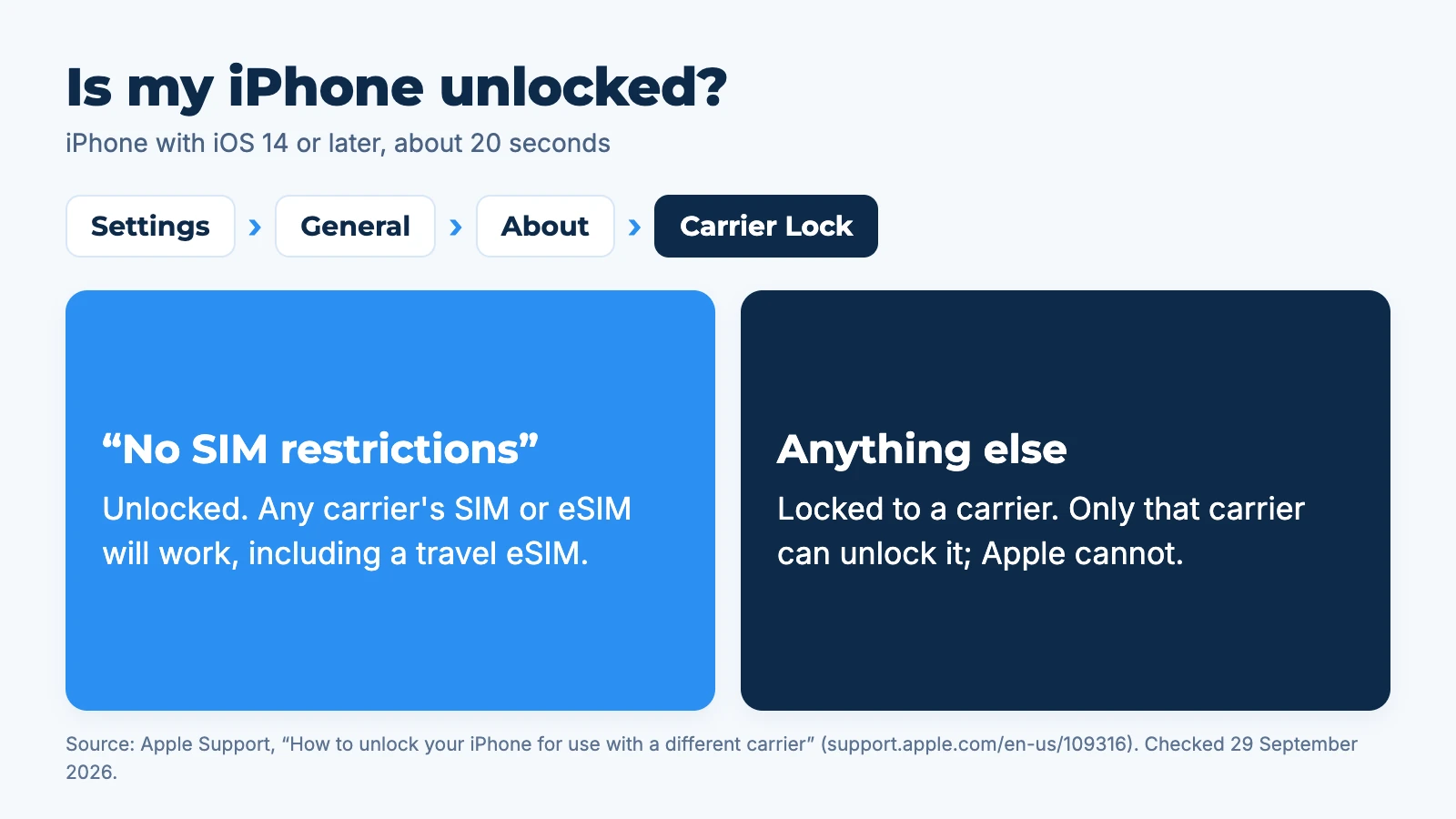
If you see anything else there, the iPhone is locked to a carrier. Apple says: "Only your current carrier can unlock your iPhone."
On iOS 13 or earlier there is no Carrier Lock line. Apple's advice is to confirm the unlock with your carrier, then erase the phone and restore it from a backup to complete it.
How to check if an Android phone is unlocked
On a Samsung Galaxy, Samsung's own menu shows the lock status: Settings, Connections, More connection settings, Network unlock, then open Network lock status. Samsung describes it as the place to "view your device's network lock status and check if your device is eligible to be unlocked."
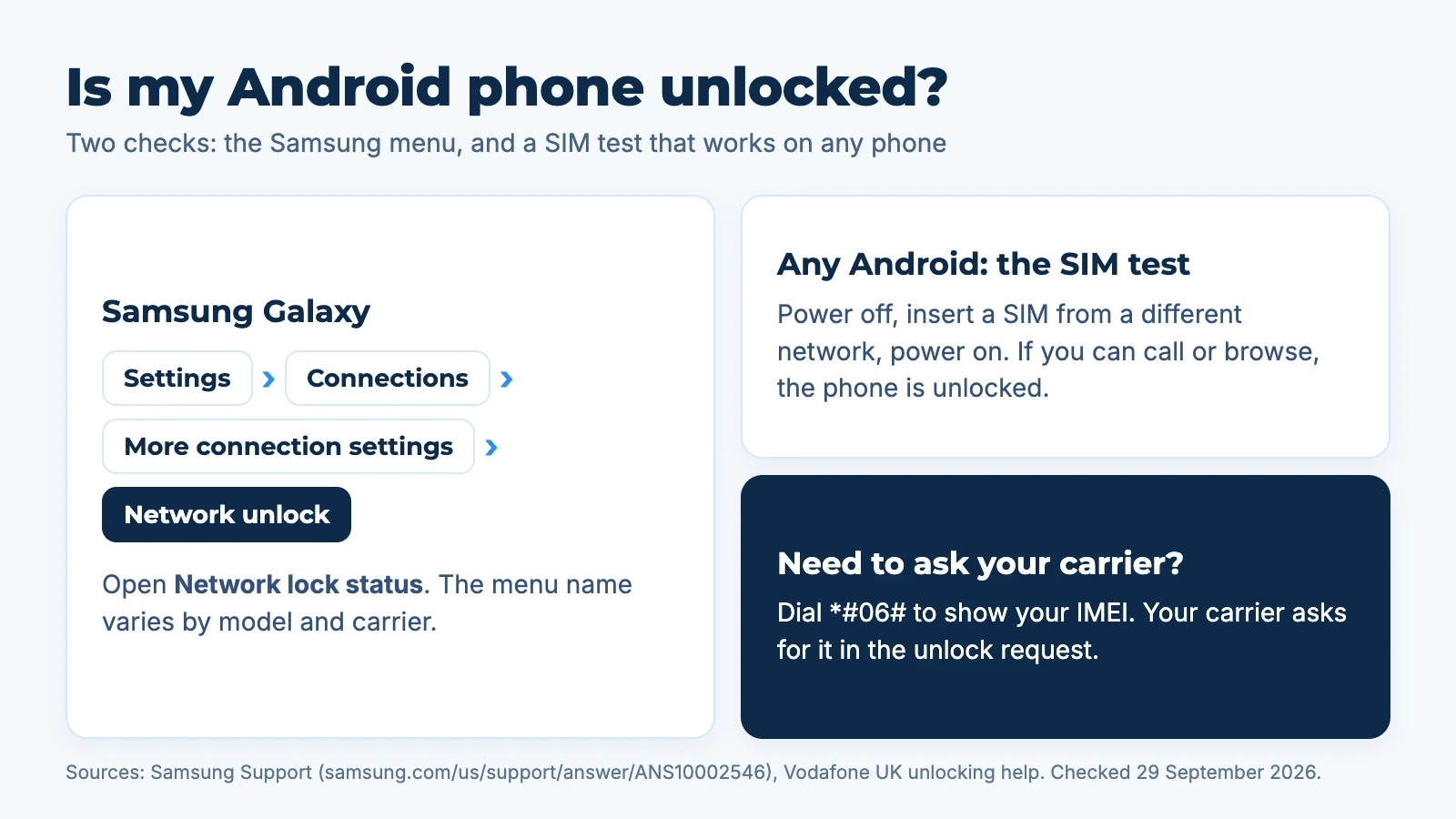
The menu name varies by model, country and carrier, and some older Galaxy phones do not have it. Google does not publish an equivalent lock-status screen for Pixel phones. For those, and for any other Android phone, use the SIM test.
The SIM test: works on any phone
- Borrow a SIM card from a friend on a different network.
- Power the phone off, swap the SIM in, power it on.
- Make a call or load a web page with Wi-Fi off.
If it works, the phone is unlocked. If you see "SIM not supported", "Enter network unlock PIN" or no service, it is locked. Vodafone UK suggests the same test before you request an unlock.
Can you check if a phone is unlocked by IMEI?
Partly. Your IMEI is the phone's serial number; dial *#06# to see it. Some websites offer an IMEI unlock check, but their data comes from third parties and is not always current. The carrier that sold the phone is the reliable source, and every carrier unlock request asks for the IMEI anyway.
How to check if your phone is unlocked for eSIM
The same checks apply: an eSIM is refused by a locked phone exactly as a plastic SIM is. Two things are worth checking together:
| Check | How | What you learn |
|---|---|---|
| Carrier lock | iPhone Carrier Lock, Samsung Network unlock, or the SIM test | Whether another network's eSIM will be accepted |
| eSIM support | The eSIM compatibility checker | Whether the model has an eSIM at all |
| Region | Where the phone was bought | Some models sold in some regions lack eSIM |
If your phone is both unlocked and eSIM-capable, a travel eSIM for your destination should install and connect. If you are new to all this, start with what is an eSIM.
What to do if your phone is locked
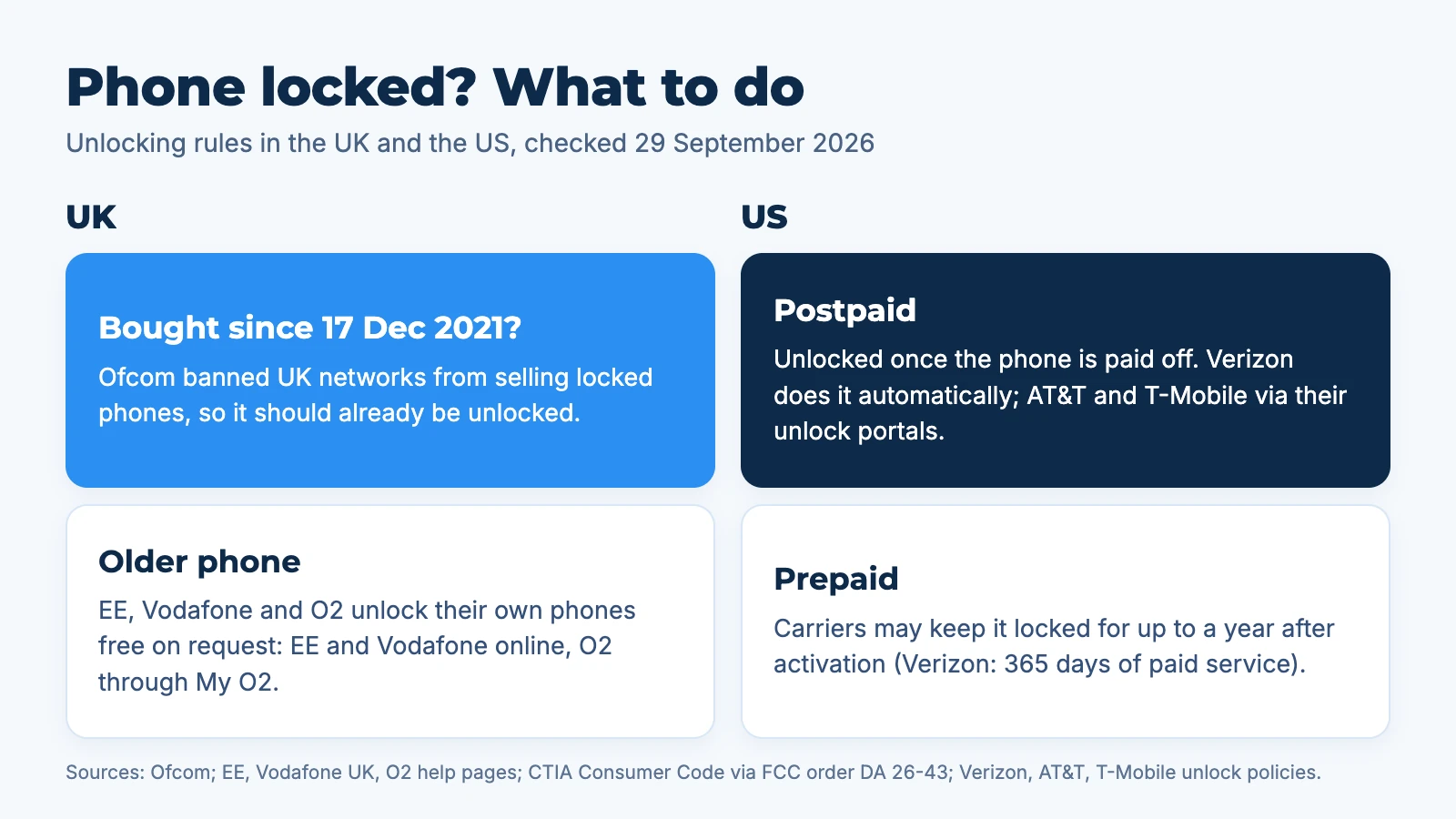
Ask the carrier that sold it to unlock it. In the UK this is usually free and online; in the US it depends on whether the phone is paid off.
UK carrier unlock rules
Since 17 December 2021, Ofcom has banned UK mobile companies from selling locked phones. Ofcom had found that unlocking could cost around £10 and that more than a third of people who decided not to switch network said the lock put them off. A phone bought from a UK network after that date should already be unlocked.
For older phones:
| Carrier | Cost | How to request | Source |
|---|---|---|---|
| EE | Free | Online, with your IMEI; handsets EE does not recognise can take 3 to 14 working days via the manufacturer | EE Help |
| Vodafone UK | Free | Online unlock code request form; phones bought from Vodafone after 1 January 2022 are already unlocked | Vodafone Help |
| O2 | Free | Through My O2, as the account holder; usually within 7 days, up to 10 working days | O2 Help |
We could not confirm Three's current unlock terms on its own site, so check with Three directly.
US carrier unlock rules
US carriers follow the CTIA Consumer Code: postpaid phones are unlocked once the contract, financing or early termination fee is settled, prepaid phones no later than one year after activation, and eligible requests are handled within two business days.
- Verizon changed its policy on 18 February 2026, after an FCC order of 12 January 2026. Postpaid phones now unlock automatically once bought outright or paid off; prepaid phones stay locked until 365 days of paid, active service.
- AT&T unlocks postpaid phones bought at least 60 days ago and paid in full, with the account not past due, through att.com/deviceunlock. Prepaid phones need 12 months of paid service.
- T-Mobile unlocks postpaid phones after 40 days active on the line with the device paid off. Prepaid phones qualify after 365 days, or earlier with more than $100 of refills and at least 14 days since purchase.
If you are visiting the US on a UK phone, the US rules do not apply to you. You need a phone unlocked by your home carrier, then an eSIM for the USA works on it. The USA plan is for visitors; US residents cannot use it.
In short: check the lock at home, a week before you fly. UK unlocks can take up to 10 working days, and none of them can be done from an airport.
What if you cannot unlock it before the trip?
Use your home carrier's roaming, at its roaming prices, or rely on Wi-Fi and keep mobile data off. Check the lock early so you need neither.
Some Samsung phones also list a Temporary unlock option in the Network unlock menu, which your carrier has to approve.
Once the phone is unlocked, tell Aynet your trip and get one data plan sized to it. For how the eSIM then gets onto your phone, see how does an eSIM work.
FAQ
How do I know if my phone is unlocked without a SIM?
On an iPhone, go to Settings, General, About and read Carrier Lock; it needs no SIM. On a Samsung, check Settings, Connections, More connection settings, Network unlock. Otherwise ask your carrier with your IMEI, which you get by dialling *#06#.
Is my phone unlocked if I bought it outright?
Usually, but not always. A phone bought directly from Apple, Samsung or Google without a carrier plan is normally unlocked. A phone bought outright from a carrier may still be locked, although UK networks have been banned from selling locked phones since 17 December 2021.
Does a locked phone work with an eSIM?
No, not with another network's eSIM. A carrier-locked phone only accepts eSIMs from the carrier it is locked to. Unlock it first, then install the travel eSIM.
How long does it take to unlock a phone in the UK?
It is usually quick, but allow up to 10 working days. O2 says requests usually take up to 7 days and up to 10 working days when it needs the manufacturer, and EE says unrecognised handsets can take 3 to 14 working days. EE, Vodafone and O2 all unlock their own phones for free.
Does unlocking a phone delete data?
Usually not. Most unlocks are applied over the air or with a code and keep your data. On an iPhone with iOS 13 or earlier, Apple's method includes erasing and restoring from a backup, so back up first.
Sources: Apple, Unlock your iPhone for a different carrier, Samsung, Network unlock status, Ofcom, locked handset ban, EE, Unlock an EE device, Vodafone UK, Unlocking your phone, O2, Unlocking an O2 mobile, FCC order DA 26-43 (CTIA Consumer Code), Verizon, Device unlocking policy, AT&T, Unlock your device, T-Mobile, SIM unlock policy. All checked 29 September 2026.
Redo när du är det
Redo att planera din resa?
Beskriv vart du ska åka och få en tydlig eSIM-rekommendation med ett faktiskt pris.
- #Compatibility
- #Unlocking
Om författaren
Smail Yassine
Editor
Edits and fact-checks Aynet's travel connectivity guides.